CentPage: A Free Productivity New Tab for Chrome and Firefox
What CentPage puts on your new tab, how to set it up in ten minutes, and widget setups for students, creators and remote workers. Free for Chrome and Firefox.

You probably open a new tab dozens of times a day. Usually it shows a search box and a few shortcuts, and you type something and move on. CentPage, from the same maker as SummaryTube, turns that page into a dashboard: search, the sites you use most, and small tools like a to-do list, notes and a timer.
This guide covers what CentPage does, how to set it up and a few setups that work well, including one for people who learn on YouTube.
What's on a CentPage new tab
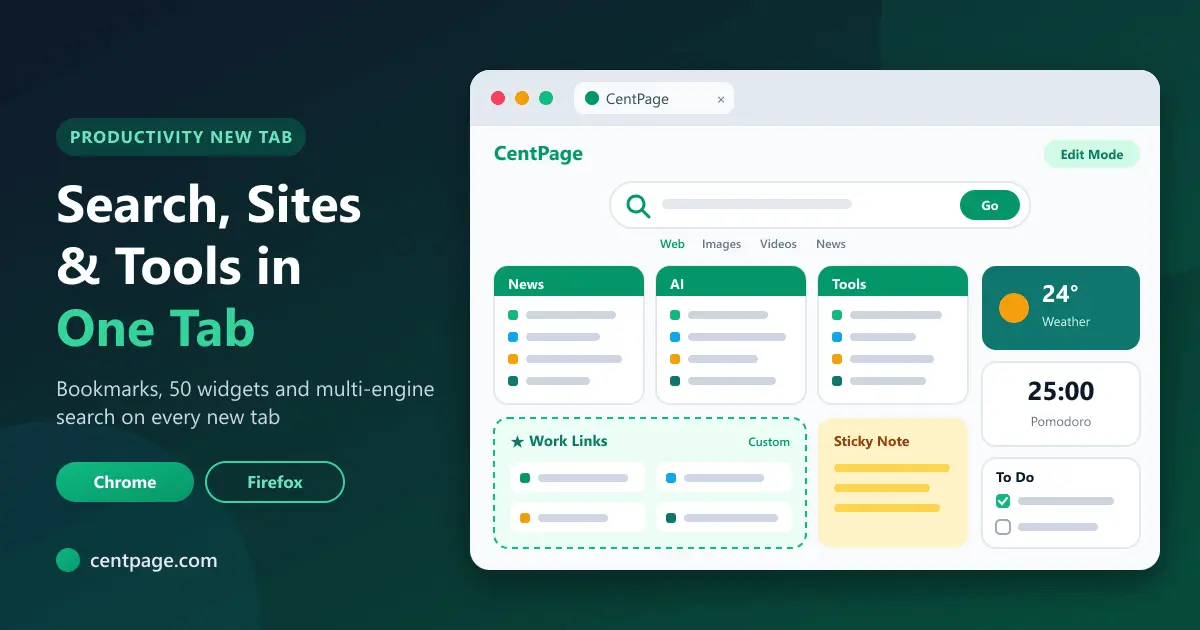
A CentPage dashboard has four parts:
- Multi-engine search. Search Google, Bing, Yahoo and other engines from one bar, with modes for web, images, videos and news.
- Curated website categories. Ready-made tables of popular sites in 18+ categories, such as News, AI, Learn, Videos, Tools and Finance, so the page is useful before you customize anything.
- Custom bookmark tables. Your own named tables of links, such as "Course portals" or "Work".
- Widgets. Fifty small tools in seven groups, from productivity and learning to finance, health and utilities.
You arrange everything in edit mode by dragging categories and links into the order you want.
Widgets worth knowing
CentPage has 50 widgets; 20 are free. A few that are especially useful:
| Widget | Good for |
|---|---|
| To Do List | Keeping today's tasks visible on every new tab |
| Sticky Notes | Quick notes you'd otherwise lose in a document somewhere |
| Pomodoro Timer | Focus blocks for studying or deep work |
| Calendar and Clock & Timer | Dates, a world clock, stopwatch and countdown |
| Weather | The forecast without opening another site |
| Currency and Unit Converter | Quick conversions while shopping or cooking |
| Language Translator and Dictionary | Words and phrases while you read |
| YouTube Feed | Videos from channels you choose, on your terms |
The advice from CentPage's own guide holds: five widgets you use beat twenty you ignore. Its roundup of the best free browser widgets helps you choose.
Set it up in ten minutes
- Install the extension for Chrome or Firefox. Your new tab becomes your CentPage dashboard. In other browsers you can set centpage.com as your homepage instead.
- Create a free account so your layout is saved and appears on any device where you sign in.
- Enter edit mode and drag the categories you use most to the top.
- Add three to five widgets, for example To Do List, Sticky Notes, Pomodoro Timer and Weather.
- Build one custom table with the sites you open every day, most important first.
Three setups to copy
For learning on YouTube
- To Do List with today's learning goal at the top.
- Pomodoro Timer for 25-minute study blocks.
- Sticky Notes for questions to look up later.
- A custom table with your course pages, playlists and SummaryTube.
This is the setup from our guide to staying focused when learning from YouTube, and it pairs well with SummaryTube: summarize a video, add the key moments to your list, then start a timer.
For video creators
- To Do List for this week's scripting, filming and editing tasks.
- Calendar for upload dates.
- A custom table with YouTube Studio, your analytics, your editor and your asset folders.
- Sticky Notes for video ideas as they come.
For remote workers
- Clock & Timer with a world clock for teammates in other time zones.
- To Do List and Calendar for the day's priorities.
- A custom table for work apps, and a second one (Premium) for personal links, so the two don't mix.
CentPage's blog covers more setups, including a study dashboard for students and a remote work browser setup.
Free and Premium
The core of CentPage is free: the dashboard and extension, multi-engine search, curated categories, edit mode, one custom table with up to eight links and 20 widgets (some with daily limits). Premium adds all 50 widgets without limits, five custom tables, no ads, a personal URL and priority support.
Every widget works without installing anything
Each CentPage widget also has its own page on centpage.com, so you can use the Pomodoro timer or unit converter in any browser, no extension needed. It's a quick way to try a tool before you add it to your dashboard.
Privacy and permissions
The CentPage extension's job is narrow: it shows your CentPage dashboard when you open a new tab. Your layout, tables and widgets are stored with your CentPage account, which is how the same dashboard appears on your other devices. You can review the extension's permissions on its store page before installing.
Frequently asked questions
What is CentPage?
CentPage is a personalized homepage and new tab dashboard with multi-engine search, curated website categories, custom bookmark tables and 50 widgets. It works as a website and as a new tab extension for Chrome and Firefox.
Is CentPage free?
Yes. The dashboard, extension, search, categories, one custom table and 20 widgets are free. Premium is optional and adds more widgets and tables and removes ads.
Does CentPage work in Edge or Safari?
The extension is available for Chrome and Firefox. In other browsers, you can use CentPage by setting centpage.com as your homepage or keeping it in a pinned tab.
Can I use my CentPage layout on another computer?
Yes. Sign in with your free account and your layout, tables and widgets appear on any device.


