How to Organize Your YouTube Watch Later List (and Actually Watch It)
Tame an overflowing Watch Later list: remove watched videos, triage with summaries, sort into playlists and keep a weekly routine.

Watch Later starts as a good intention and ends as a graveyard: hundreds of videos, many already watched, some no longer available, none in any order. A short cleanup and one weekly habit turn it back into something useful.
Step 1: Clear what's already done
- Open Watch Later (in You or Library, depending on your YouTube version).
- Open the playlist's ⋮ menu and choose Remove watched videos.
- Scroll the rest and remove anything you no longer care about. Be ruthless; you saved it for a version of you that never had time.
Step 2: Triage with summaries
For each video you're unsure about, read a summary before deciding. SummaryTube gives you the main points and key moments in seconds, which makes the decision easy:
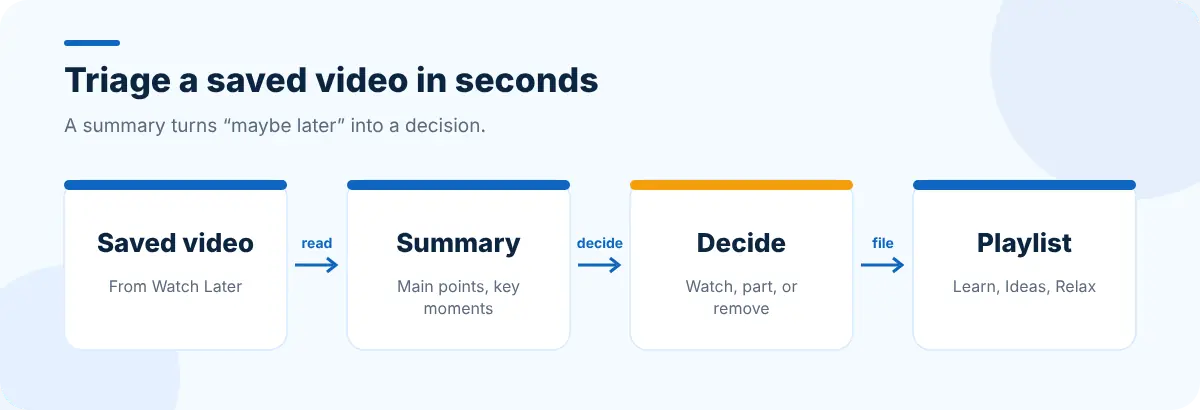
- Watch it soon: move it to the top.
- Only one part matters: note the timestamp and remove the video.
- The summary was enough: remove it.
Step 3: Split it into a few playlists
One big list is hard to choose from. Create three to five playlists by purpose instead:
| Playlist | What goes in |
|---|---|
| Learn | Tutorials and courses you're working through |
| Ideas | Talks and interviews to think about |
| Relax | Entertainment for downtime |
| Reference | Videos you'll come back to, such as a recipe or a how-to |
Keep Watch Later itself as an inbox for new saves, and empty it into these playlists each week.
Step 4: A weekly 10-minute routine
- Remove watched videos.
- Summarize new saves and decide: keep, keep part, or remove.
- Move keepers into the right playlist.
- Pick two videos for the week and put them at the top of their playlists.
Stop the list growing so fast
- Summarize before saving. If the summary answers your question, you don't need to save the video.
- Save to a playlist, not to Watch Later, when you already know what it's for.
- Close video tabs instead of leaving them open "to watch later". If you've got a pile open now, save them as a session with Super Session Manager and work through them deliberately.
- Plan watching time. A focus block on your new tab with CentPage's Pomodoro timer and to-do list makes "watch the tutorial" a scheduled task, not a someday.
For tutorials specifically, see how to learn faster from YouTube tutorials; for long episodes, summarizing podcasts and interviews.
Frequently asked questions
How do I clear watched videos from Watch Later?
Open Watch Later, open the playlist menu (⋮) and choose Remove watched videos.
Is there a limit to Watch Later?
YouTube playlists have a maximum size, and very large lists become slow to browse. Keeping Watch Later as a small inbox avoids both problems.
How do I decide what to watch from a long list?
Read a short summary of each video and keep only the ones with something you need, then pick two per week and put them at the top.


