How to Summarize Long YouTube Podcasts and Interviews
Get the key ideas from two- and three-hour podcasts and interviews without watching it all: summaries, key moments and transcript search.

Long-form podcasts and interviews are full of good ideas, spread across two or three hours of conversation. Few people have that time, and even fewer remember much a week later. Here's how to get the value out of long conversations efficiently.
Why long conversations are hard to summarize
- No structure. Topics come and go, and the best point might be at 1:47:00.
- Tangents. Conversations wander, by design.
- Multiple speakers, often with different views.
- Few chapters. Many podcast uploads have none.
A three-step approach
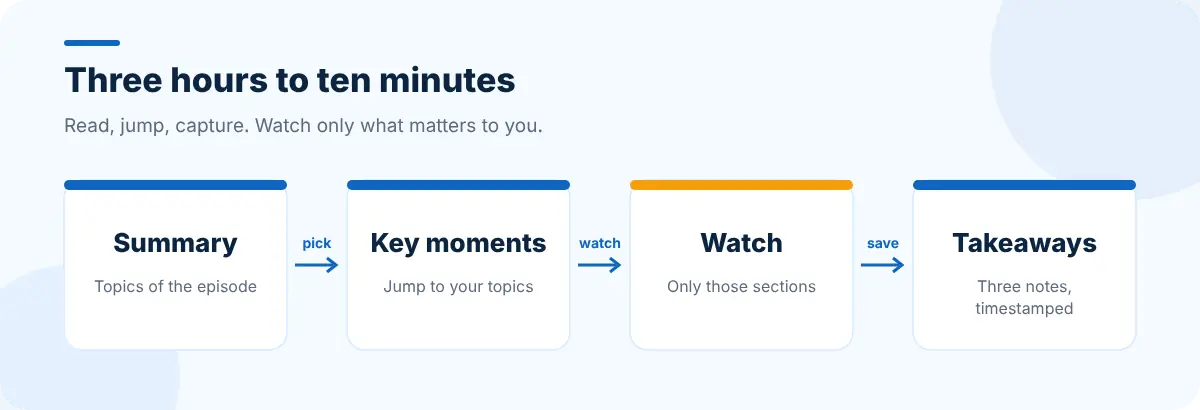
1. Read the summary and decide
Open the episode in SummaryTube and read the summary grouped by topic. Decide: is there anything here for you? If not, you've saved three hours. If there is, note which topics.
2. Jump to the key moments
Use the key moments list to jump to the topics you picked and watch just those sections, perhaps at 1.25× speed. If you're looking for something specific (a book recommendation, a tool, a statistic), search the transcript for it. Our guide to finding key moments in a video covers every method.

3. Capture three takeaways
Write down three things: an idea, a piece of evidence or example, and one thing you'll try or look into. Include the timestamp so you can find it again. That's a far more useful record than a full summary you'll never reread.
What to capture from different kinds of episodes
| Episode type | Capture |
|---|---|
| Expert interview | Claims, the evidence for them, and recommended resources |
| Founder or career story | Decisions, turning points and the lessons they draw |
| Debate | Each side's strongest argument |
| Q&A or AMA | The questions closest to yours, with timestamps |
Use the comments and Q&A
Long episodes often have viewers posting timestamped highlights in the comments. SummaryTube also shows the video's top comments and a Q&A view that turns the conversation into questions and answers, which is a quick way to find the answer to a specific question.
Build a listening queue you'll actually finish
- Save episodes you mean to watch to a single playlist and summarize them before watching; see organizing your Watch Later list.
- Keep research tabs from an episode (the books, papers and tools mentioned) as a session with Super Session Manager.
- If a source mentioned in an episode has since disappeared or changed, Web Archive Viewer can find archived versions of the page.
Frequently asked questions
How do I summarize a long YouTube podcast?
Paste the episode link into an AI summarizer like SummaryTube to get a summary and key moments, then watch only the sections that matter to you and write down a few takeaways with timestamps.
Are summaries of long conversations reliable?
They're good at the main topics, but can miss nuance, disagreements and who said what. Check important points in the video itself using the timestamps.
How can I remember more from podcasts?
Capture three takeaways per episode in your own words, with timestamps, and review them a few days later.


