Super Session Manager: Save, Restore and Organize Tabs
A practical guide to Super Session Manager, the free tab session manager for Chrome, Edge and Firefox: saving sessions, tab groups, tools and Pro.

Most people manage tabs by never closing them. It works until the browser slows to a crawl, the laptop restarts for an update, or the tab you needed is one of eighty tiny icons. A session manager fixes that by turning a window of tabs into something you can save, name, close and reopen later.
Super Session Manager is the session manager from the same maker as SummaryTube. This guide covers what it does, how to get started and how it fits into a day of research, learning or work.
What Super Session Manager does
At its core, Super Session Manager saves the tabs in a window (or in every window) as a session: a named list of pages you can reopen in one click. Around that core it adds tools for organizing, cleaning up and backing up your tabs.
| You want to… | Super Session Manager |
|---|---|
| Close a project for today and pick it up tomorrow | Save the window as a named session, restore it later |
| Keep Chrome tab groups | Saves group names, colors and order, and restores them |
| Find an old set of tabs | Search sessions by name, URL or page title |
| Protect an important session | Lock it against accidental changes, archive it when finished |
| Back up or move sessions | Export and import as JSON |
| Tidy a messy window | Close duplicate tabs, group tabs by domain, suspend idle tabs |
| Use sessions on two computers | Cloud Sync (Pro) |
It works in Chrome, Edge and Firefox, the interface is available in more than 30 languages, and sessions are stored locally on your device unless you choose to sync them.
Getting started in five minutes
- Install the extension for Chrome, Edge or Firefox, and pin it to the toolbar.
- Save your current window. Type a name and click Save Session. Your tabs are now safe even if you close them.
- Close the window, then reopen the session from the extension to see how restoring works.
- Try a temporary session for tabs you only need to park for a short while.
- Export a backup from the Backup tab once you've saved a few sessions you care about.
Saving: windows, tab groups and pinned tabs
When you save, you choose what goes into the session. You can include tabs from every open window, keep Chrome tab groups with their names, colors and order, and include pinned tabs. When you restore, the session opens in a new window, so it never mixes with what you have open now. You can also add a session's tabs to the current window or replace the current window with it.
Organizing sessions
A handful of sessions is easy. Dozens need structure, and the extension has several tools for that:
- Pin your most-used sessions to the top of the list.
- Lock a session so it can't be edited or deleted by accident.
- Archive old sessions to hide them without deleting them.
- Sort the list several ways, including your own custom drag-and-drop order.
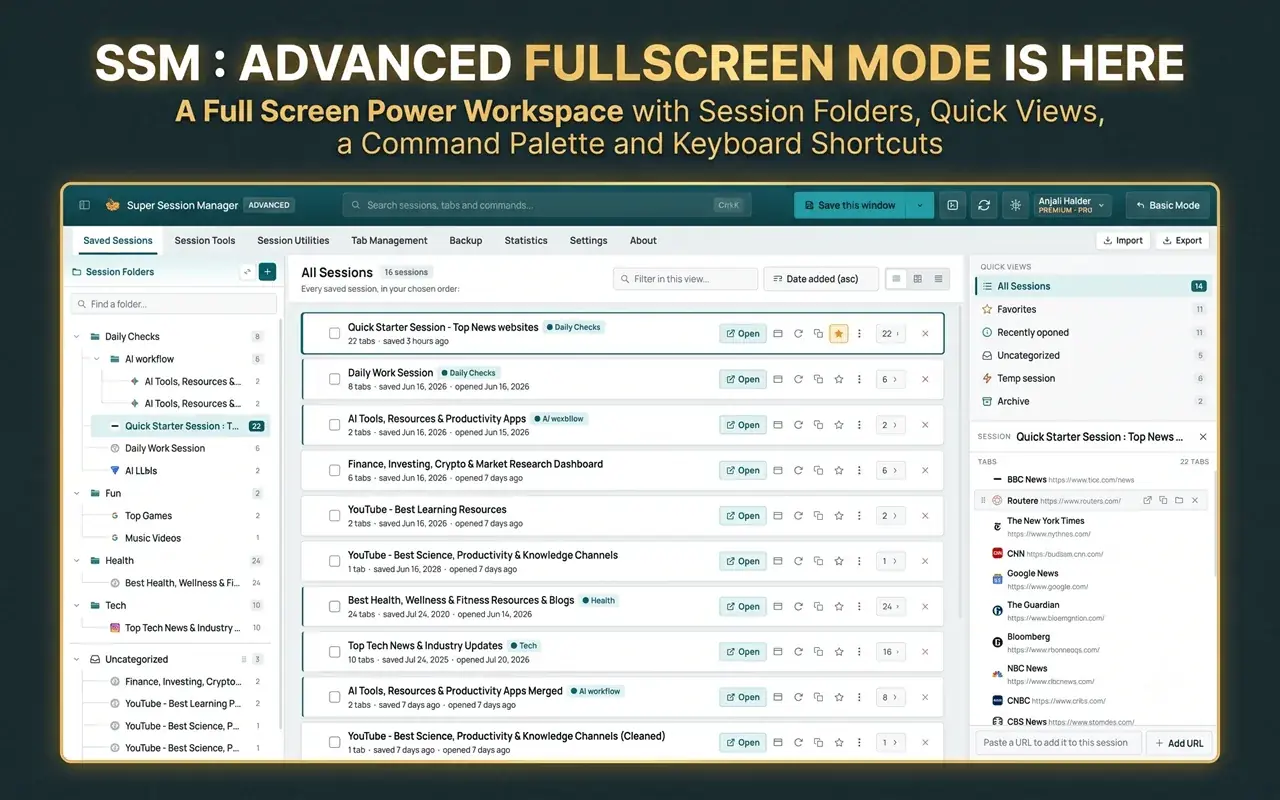
- Advanced Mode opens a full-screen workspace with session folders, a quick view of each session's tabs, a command palette and keyboard shortcuts.
Session tools for messy windows
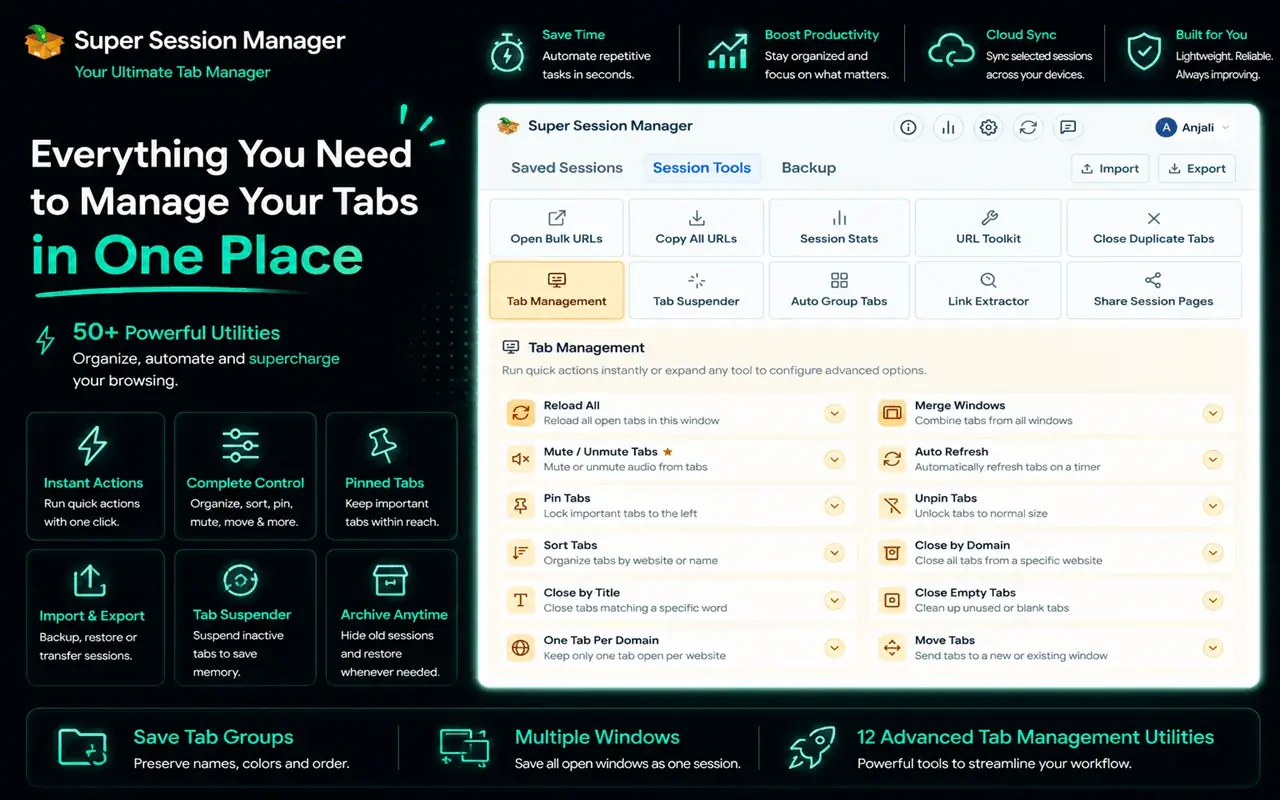
Beyond saving, Super Session Manager has a set of tools for cleaning up and working with tabs and links:
- Close Duplicate Tabs finds tabs open more than once and keeps one of each.
- Auto-group tabs by domain or subdomain.
- Tab Suspender puts idle tabs to sleep to save memory and wakes them when you return.
- Copy All URLs as plain text, Markdown or CSV, and Open Bulk URLs from a pasted list.
- URL Cleaner strips tracking parameters such as utm tags before you share a link.
- Session Stats shows tab counts, duplicates and top domains.
- Share Session Pages turns a session into a shareable web page, optionally with a password.
Free and Pro
The core of Super Session Manager is free: saving and restoring sessions, tab groups, organizing, export and import, and the session tools. Pro is optional and adds:
- Cloud Sync between your devices, with automatic sync when sessions change.
- Recovery of deleted sessions from rolling automatic snapshots.
- Advanced tab management tools such as merging windows, muting, sorting and closing tabs by domain or title.
Current plans are on the Super Session Manager pricing page.
Privacy
A session manager can see your tab addresses, so it's fair to ask what happens to them. Super Session Manager stores sessions on your device by default, doesn't track you and doesn't sell data. If you sign in and turn on Cloud Sync, your sessions are synced to your account so they can appear on your other devices; you can turn sync off in settings at any time.
How it fits with SummaryTube
If you learn or research on YouTube, the two work well together. Summarize videos with SummaryTube to decide which ones are worth your time, keep the worthwhile ones and their related articles as a saved session, and reopen it when you sit down to work. Our guide to saving YouTube research tabs as a session walks through the routine step by step.
For more on tab management, Super Session Manager's own blog has guides such as how to organize hundreds of browser tabs and a comparison of Chrome tab groups, bookmarks and sessions.
Frequently asked questions
What is a session manager?
A browser extension that saves a set of open tabs (usually a window) under a name, so you can close them and reopen the same tabs later. It's quicker to restore than a bookmark folder and safer than leaving tabs open.
Does Super Session Manager save tab groups?
Yes. In Chrome it saves tab groups with their names, colors and order and restores them as groups.
Can I move my sessions from another extension?
Yes. Super Session Manager can import sessions from other popular session extensions, import bookmark folders as sessions, and import its own JSON backups.
Is my data private?
Sessions are stored locally by default. Nothing is synced unless you sign in and turn on Cloud Sync, and the extension doesn't track you or sell data.


